
Atlassian has released a security improvement that helps organizations protect their data in Confluence and Jira.
Now, the data export rule also blocks users from downloading attached files. When this rule is active, users won’t see the Download option for attachments in file previews, attachment lists, or macros.
This update applies automatically to any existing policy that already blocks data exports and requires Atlassian Guard Standard.
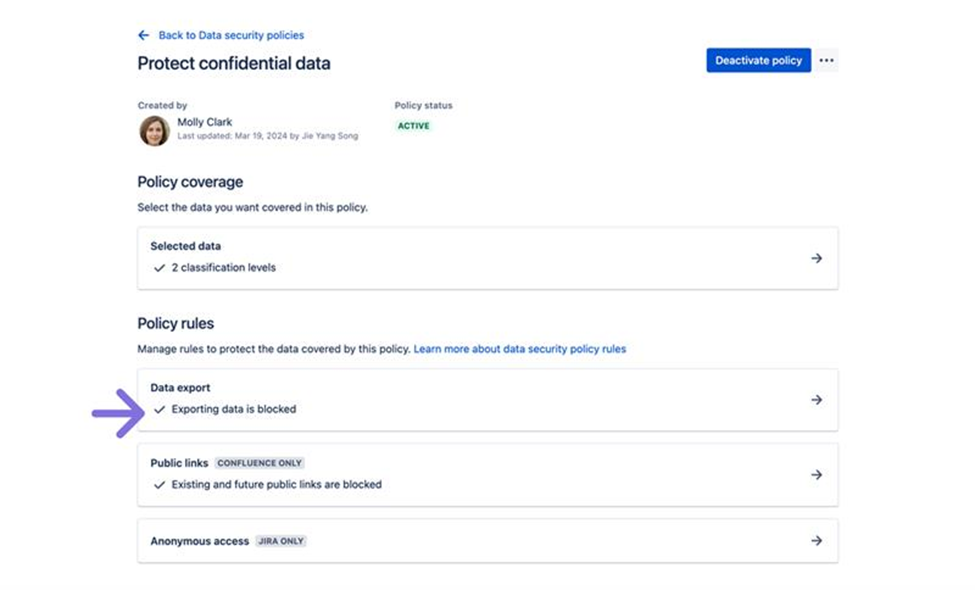
How to Check If Downloads Are Blocked
- Go to admin.atlassian.com
- Select your organization
- Navigate to Security > Data security policies
- Open a policy
- Check if Exporting data is blocked
If exports are blocked, attachment downloads are also blocked.
This change strengthens data security without adding new rules and keeps sensitive files from being downloaded.
As an Atlassian Gold Partner, we help organizations maximize the value of Atlassian tools through expert implementation, customization, and reliable support across the entire Atlassian ecosystem. Partner with us to enhance collaboration, streamline workflows, and drive business success. Contact us at atlassiansupport@ecanarys.com to get started.