
When I started exploring Microsoft’s AI agent ecosystem, I came across two offerings: Microsoft Foundry Agent Service and Microsoft Agent Framework.
Both help build AI agents, but they serve different purposes. After exploring the documentation, trying the Foundry Toolkit in VS Code, and creating agents in the Foundry portal, I got a clearer understanding of how they work and when to use each.
In this blog, I’ll share my learnings and explain the differences with a hands-on overview.
What I Understood: The Quick Answer
Microsoft Agent Framework is an open-source development framework that provides libraries and tools to build AI agents using code.
Microsoft Foundry Agent Service is a managed Azure platform that allows us to create, run, deploy, and manage AI agents in the cloud.
Think of it this way:
- With Agent Framework, you write the agent’s logic using code, such as Python, Go or C#.
- With Foundry Agent Service, you can create an agent directly using the Foundry portal, configure its model and tools, or bring your own custom agent code and run it using a managed cloud runtime.
In fact, when I opened the Foundry Toolkit extension in Visual Studio Code and selected Create Agent, I could see these approaches side by side.
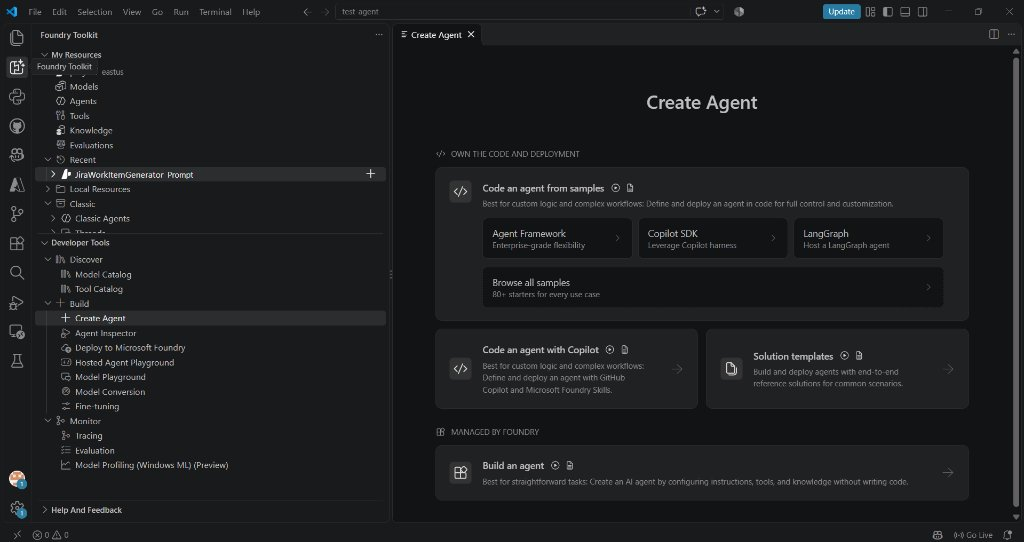
Figure 1: Foundry Toolkit in VS Code provides different approaches to agent development, including Agent Framework and Build an agent.
This was where I started understanding that Microsoft provides different ways to build agents depending on how much control developers need. Let’s explore each one.
1. Microsoft Agent Framework – Build Agents Using Code
Microsoft Agent Framework is an open-source framework for developers who want to build AI agents programmatically.
It provides the building blocks to create agents, connect them with tools, manage conversations, define workflows, and build multi-agent applications.
It supports Python, Go and .NET (C#), making it useful for developers working with different technology stacks.
What can we build with it?
Some of the important capabilities include:
- Custom agent logic: Write your own business logic and control how the agent processes requests.
- Tool integration: Connect agents with APIs, databases, and external services.
- Multi-agent collaboration: Create multiple agents that work together to complete complex tasks.
- Workflow orchestration: Define how different agents and functions interact with each other.
- Conversation management: Manage conversation history and state using the framework’s capabilities.
- Model flexibility: Integrate with different supported model providers.
My Hands-on Experience with Agent Framework
While exploring the Foundry Toolkit in VS Code, I selected Agent Framework under the Code an agent from samples option.
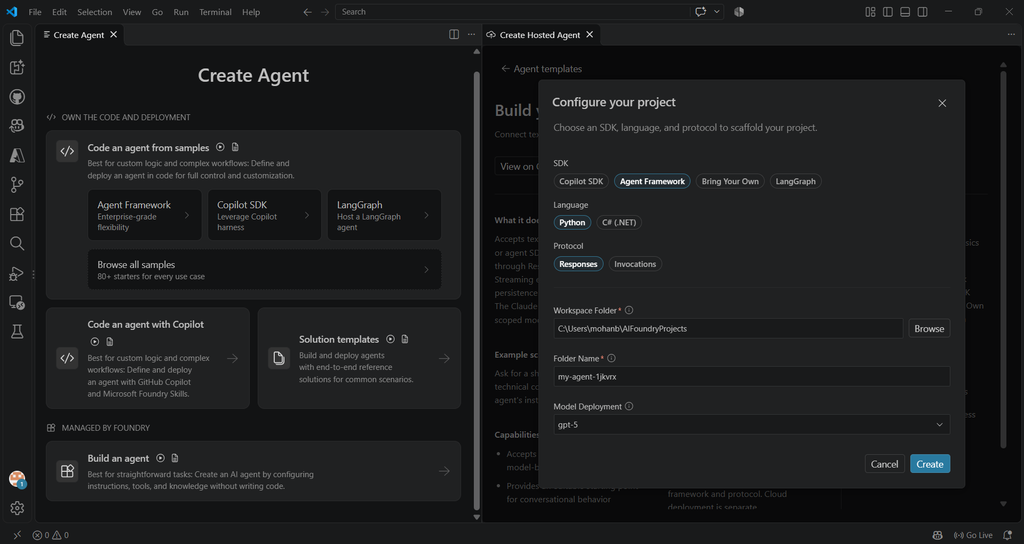
Figure 2: Creating a Hosted Agent Using Microsoft Agent Framework in VS Code
It provided a starting point to create an agent using code. I created a sample project and explored how the agent could be developed and tested locally.
One interesting feature I explored was the Agent Inspector. It provides a playground where developers can interact with their locally running agent and inspect its execution.
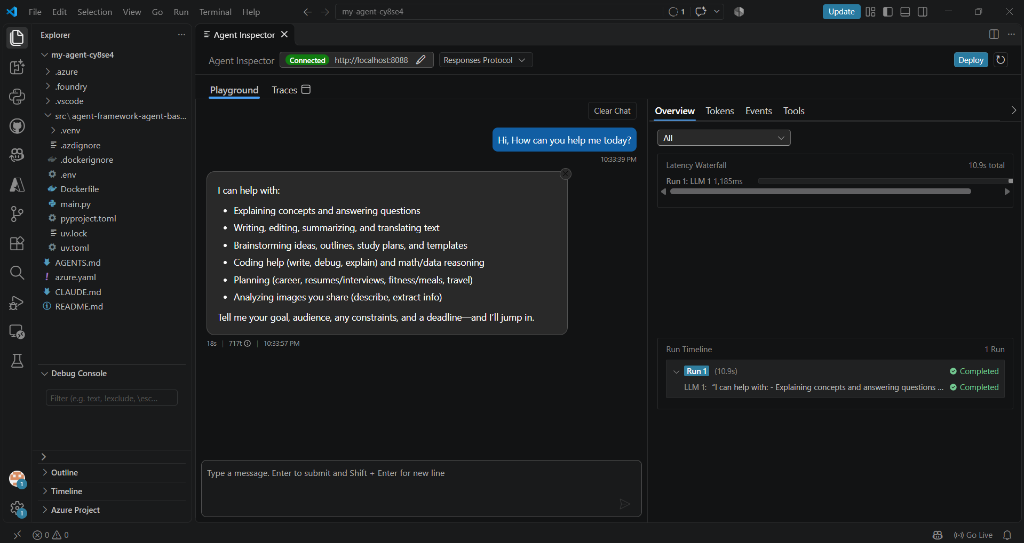
Figure 3: Testing a locally developed Agent Framework agent using Agent Inspector in VS Code.
The important point is that Agent Framework gives developers control over the implementation. You write the agent logic and decide how it should work.
In simple words, Use Agent Framework when you want to build AI agents using your own code and need flexibility to implement custom logic, workflows, and multi-agent scenarios.
2. Microsoft Foundry Agent Service – Create and Manage Agents in the Cloud
Microsoft Foundry Agent Service is a managed Azure service for creating, running, deploying, and managing AI agents.
One thing I learned during my exploration is that it is not just for hosting agents developed using code. We can also create agents directly in the Foundry portal by configuring models, instructions, and tools and we call it as Prompt-based Agents.
There are two approaches to understand.
Approach 1: Create an Agent Directly in the Foundry Portal
Step 1: Create an Prompt-based Agent
Open your Foundry project in Foundry Portal, navigate to Agents, and select Create an agent. Provide an agent name and choose the interaction mode, such as Text or Voice.
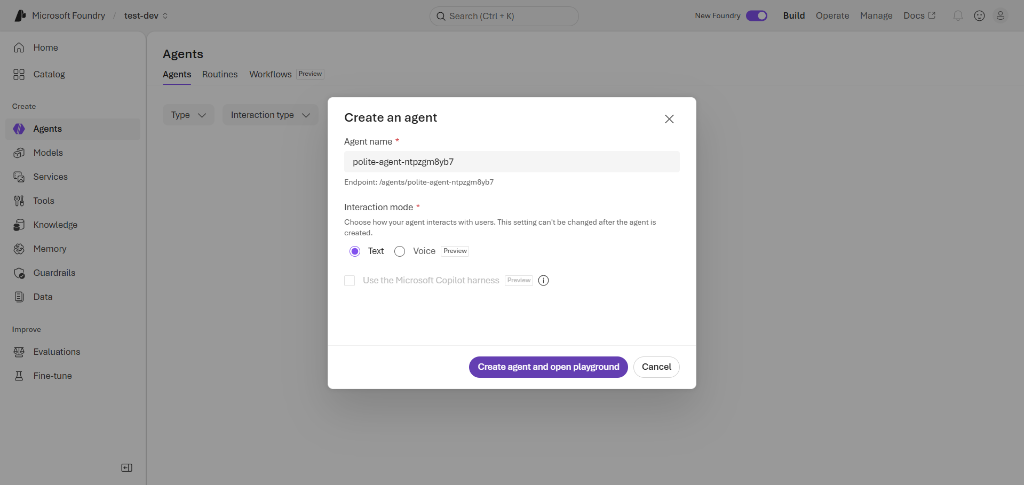
Figure 4: Creating an agent directly in the Microsoft Foundry portal.
Step 2: Select a Model and Configure Instructions
Choose an AI model and provide instructions that define the agent’s role, responsibilities, and expected behaviour.
Step 3: Add Tools
Configure the tools required by your agent, such as Web Search, File Search, Code Interpreter, custom functions, or MCP tools.
Step 4: Test the Agent
Use the Playground to interact with your agent, test different prompts, and verify its responses.
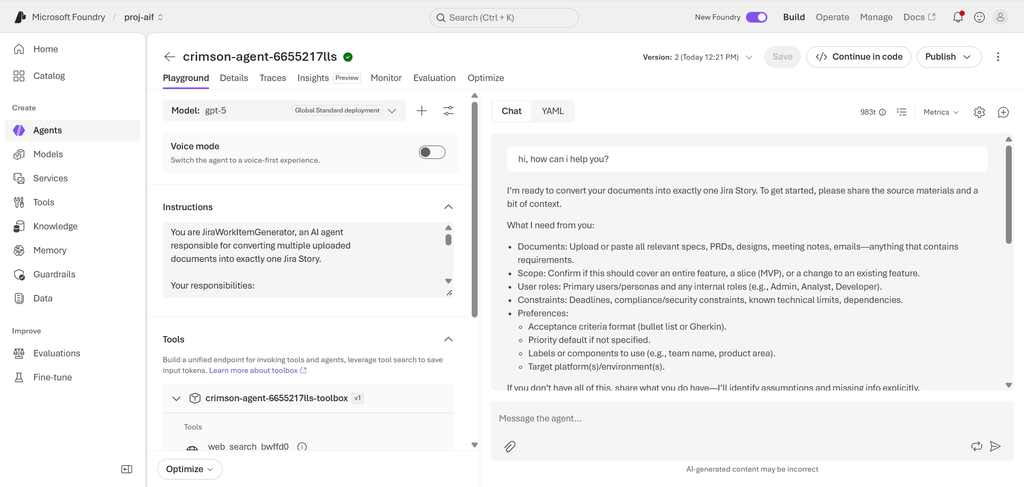
Figure 5: Configuring and testing an agent in the Foundry Playground.
Step 5: Publish the Agent
Once everything is configured and tested, explore the available publishing options to integrate your agent with supported applications.
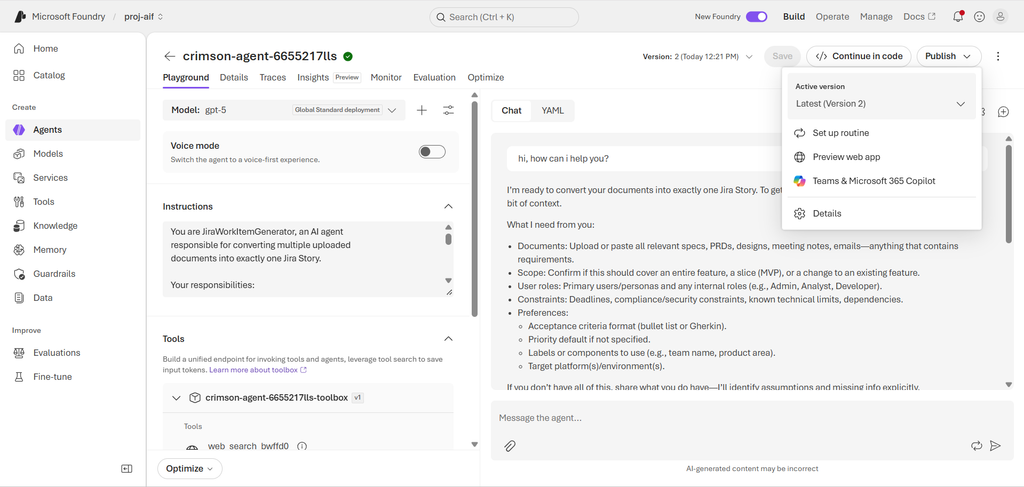
Figure 6: Exploring the publishing options in Microsoft Foundry.
Approach 2: Build Your Own Agent Using Code
What if you need custom business logic, multiple API integrations, or complex workflows?
In that case, you can develop an agent using a framework such as Microsoft Agent Framework and deploy it as a Hosted Agent in Foundry Agent Service.
You write and package your own agent code, while Foundry provides the managed hosting environment. This gives developers more control over implementation without managing all the underlying hosting infrastructure.
What Does Foundry Agent Service Provide?
Some important capabilities include:
- Managed hosting: Run supported agents in Azure.
- Model and tool integration: Connect agents with supported models and tools.
- Security: Integrate with Microsoft Entra ID and Azure security capabilities.
- Conversation management: Manage conversations for supported agent types.
- Monitoring: Inspect agent execution and traces.
- Publishing: Integrate agents with supported experiences such as Teams, Microsoft 365 Copilot, and web applications.
Can We Host Agents Built Using Other Frameworks?
Yes! This is another interesting capability of Foundry Agent Service.
You are not restricted to Microsoft Agent Framework when building Hosted Agents. You can also bring agents developed using other frameworks, such as LangGraph, or your own custom implementation.
While exploring the Foundry Toolkit in VS Code, I noticed a Bring Your Own option alongside Agent Framework, Copilot SDK, and LangGraph.
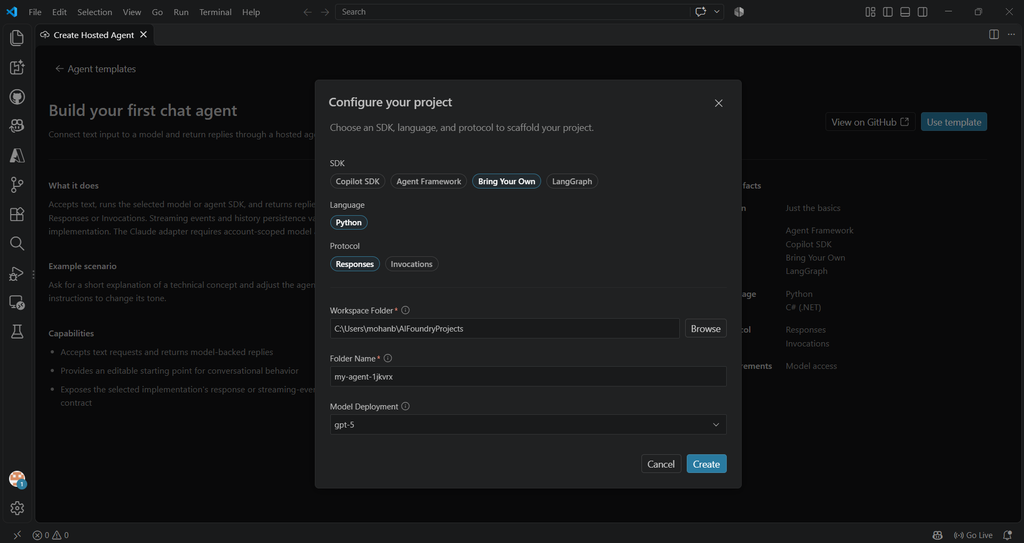
Figure 7: Foundry Toolkit provides options to use different agent development frameworks, including Bring Your Own.
In simple words, Foundry Agent Service lets you create agents through configuration or host custom-developed agents in a managed Azure environment. And the key takeaway is that you can choose the approach based on your application requirements rather than treating them as competing technologies.
Quick Comparison
Here is a quick comparison to understand where each offering fits.
| Area | Microsoft Agent Framework | Microsoft Foundry Agent Service |
|---|---|---|
| Type | Open-source developer SDK | Managed Azure cloud service |
| Primary Purpose | Build agent reasoning, workflows, and multi-agent systems in code | Create, run, secure, and scale agents in the cloud |
| Development & Languages | Code-first in Python, .NET (C#), and Go | No-code via Foundry Portal, or code via SDK and Hosted Agents |
| Custom Logic & Multi-Agent | Implemented directly in code (custom loops, graph workflows, agent handoffs) | Out-of-the-box via prompts & tools, or custom code run via Hosted Agents |
| Infrastructure | Runs anywhere (your local laptop, containers, on-premises, or any cloud) | Fully managed by Azure (automatic scaling, session storage, and security) |
| Best Suited For | Developers who want full control over code, logic, and local testing | Teams building, securing, and operating cloud-based agents |
Which One Should You Choose?
It depends on your project requirements.
- Choose Agent Framework when you need custom agent logic, complex workflows, and multi-agent development using Python, Go or .NET.
- Choose Foundry Agent Service when you want to create agents quickly using the portal and run them in a managed Azure environment.
- Use Both when you need the flexibility of custom code development along with Foundry’s managed hosting capabilities.
Ultimately, the choice depends on how much control you need over agent development and how you plan to deploy and manage it.
If you are exploring Microsoft’s AI agent ecosystem, I would recommend trying both approaches. Create a simple agent in the Foundry portal, then build another using Agent Framework in VS Code. The hands-on experience will make the differences much clearer.
Happy Learning!