
As I explored GitHub Copilot Automations, one question kept coming to mind:
What if everyday work could move forward without someone needing to remember to get it started?
A bug or defect is reported. A monitoring system detects a production issue. In each case, someone needs to notice, gather context, and decide what to do next. This is where Copilot Automations come into the picture.
Automating the initial triage of new issues
While working on a project, we often encounter bugs, defects, or other issues. We create issues to track them and assign them to our team for analysis and resolution. A developer then spends time investigating the issue, identifying the error or bug, and working on a fix.
Copilot Automations can help automate these routine tasks. For example, you can set up an automation that runs whenever a new issue is created. Copilot reviews the issue, identify bugs, recommend health checks and next steps, and add a comment to the issue.
How to create an automation
Step 1: In your GitHub repository, navigate to Agents tab, select Automations, and click Create automation.
Step 2: Choose how you want to create it: Create with Agent or manually.
Step 3: Configure the automation by selecting its triggers, writing the prompt, and choosing the tools it can use.
Step 4: If needed, set an AI credit limit to cap usage for the automation.
Step 5: After you create the automation, it will run when its trigger occurs. You can verify its run and outcome.
This approach reduces the manual effort involved in initial triage and lets developers focus on resolving issues instead of repeating analysis tasks. The images below show how you can automate these daily tasks.
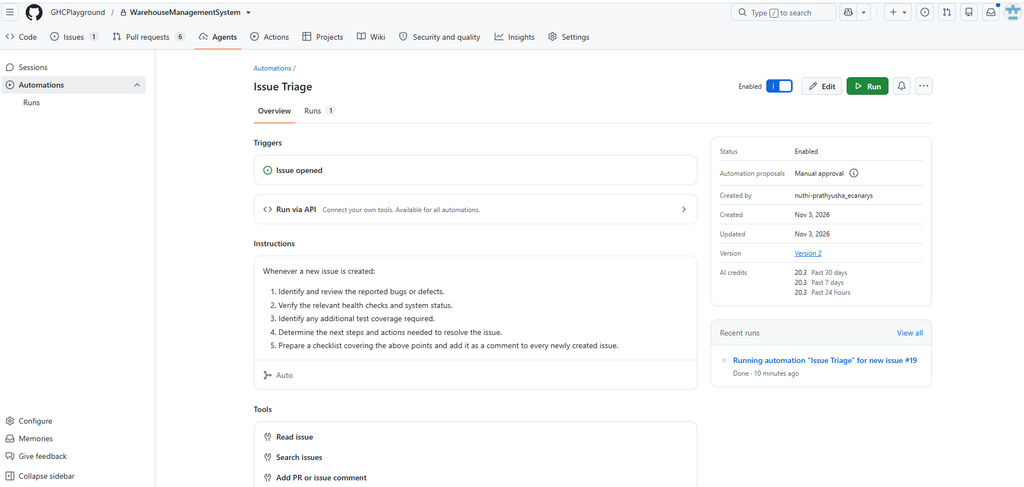
The Issue Triage automation is configured to run when a new issue is opened.
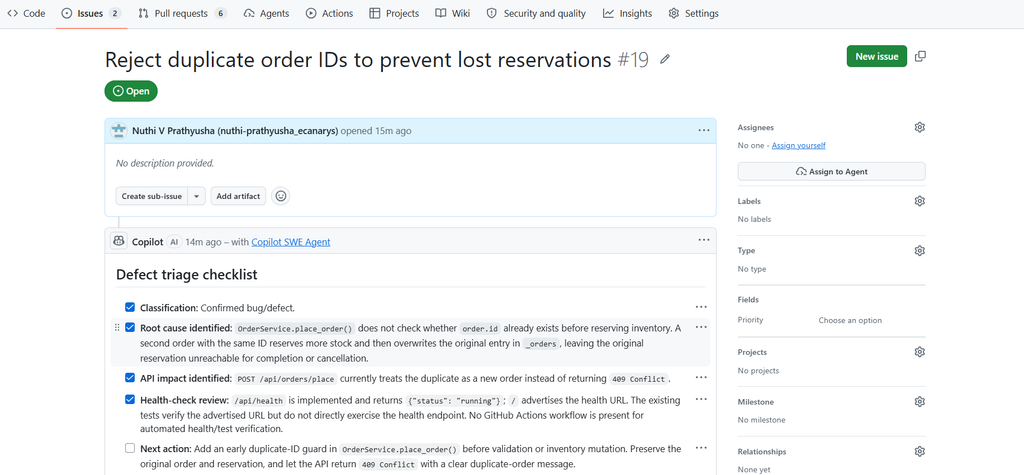
Copilot adds a defect triage checklist as a comment on the issue.
The idea I’m taking away
The most interesting part of Copilot Automations is not just that an agent can run without someone clicking “start.” A team can turn a recurring handoff into a shared workflow: define when it runs, give it limited tools, review the outcome, and improve it together.