
We’ve all been there.
You are sharing your screen, walking through a complex piece of code, and suddenly someone says:
“Wait… which line are you talking about?”
In Microsoft PowerPoint, there is a legendary feature that solves this instantly—the Laser Pointer. It’s the gold standard for guiding an audience through slides.
But when it comes to the most important “slides” we present every day—our code—that clarity has always been missing.
The Problem: The “Disappearing” Cursor
Standard mouse cursors are designed for clicking, not presenting.
On modern, high-resolution screens—especially with dark VS Code themes—a tiny white arrow easily gets lost in a sea of syntax highlighting.
Most presenters end up resorting to frantic mouse wiggling just to show where they are.
It’s distracting.
It breaks the flow.
And honestly—it looks unprofessional.
The Solution: CodePointer (Laser Pointer)
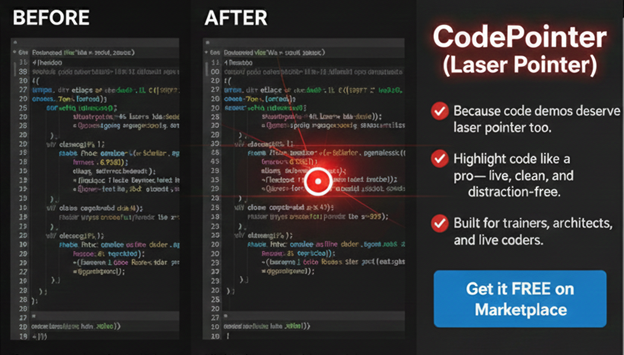
CodePointer brings the familiar PowerPoint laser-pointer experience directly into Visual Studio Code.
It’s a lightweight extension that transforms your mouse into a high-visibility laser pointer, helping you guide your audience’s attention with confidence—using a simple toggle.
No annotations.
No clutter.
Just clarity.

Why You’ll Love It
- PowerPoint-Style Precision: Point and highlight specific lines—exactly when you are explaining them.
- Dark-Mode Optimized: The glowing red laser is designed to stand out clearly against popular dark themes
- Presenter-Ready
Perfect for:
- Remote team walkthroughs
- Technical workshops & bootcamps
- Conference talks
- YouTube / Twitch live coding sessions
How to Use Code Pointer
- Install
Search for Code Pointer (Laser Pointer) in the VS Code Marketplace.
- Toggle
Use a simple keyboard shortcut to turn the laser pointer on or off.
- Lead
Stop asking “Can you see my mouse?”—and start confidently leading your audience through your code.
Present Code Like a Pro
Code deserves the same presentation clarity as slides.
If you teach, demo, explain, or present code in any form, CodePointer is a small addition that makes a big difference.
👉 Available now on the Visual Studio Code Marketplace
https://marketplace.visualstudio.com/items?itemName=canarysautomationspvtltd.canarys-code-pointer&ssr=false#overview