
Simplify Software License Tracking, Renewal Notifications, and New Product Asset Creation with ScriptFabric
Managing software licenses across an organization can quickly become complicated. As organizations adopt more software products, keeping track of license details, renewal dates, ownership, and procurement records becomes increasingly important.
Many organizations already use Jira Service Management (JSM) Assets to maintain an inventory of their software products and licenses. However, manually monitoring expiry dates, notifying responsible teams, updating renewal information, and creating asset records for newly purchased products can consume significant time and effort.
What if these processes could happen automatically within Jira Service Management?
With ScriptFabric, organizations can automate their software license management processes by combining Scheduled Events, Event Handlers, and Workflow Post Functions.
Let’s explore three practical use cases that demonstrate how ScriptFabric can simplify and automate software license lifecycle management.
Why Automate Software License Management?
A manual software license management process often creates several operational challenges:
- Missed renewal dates: Without regular monitoring, important software licenses may expire without sufficient notice.
- Manual follow-ups: Teams need to track expiry dates and contact product owners or responsible stakeholders.
- Inconsistent asset records: Newly purchased software products may not be added to JSM Assets immediately.
- Repetitive updates: Renewal dates and license information must be manually updated whenever a purchase or renewal is completed.
- Limited visibility: Procurement, IT, and asset management teams may not have a consistent view of upcoming renewals.
By automating these activities using ScriptFabric, organizations can reduce manual effort, improve visibility, and establish a more reliable software license management process.
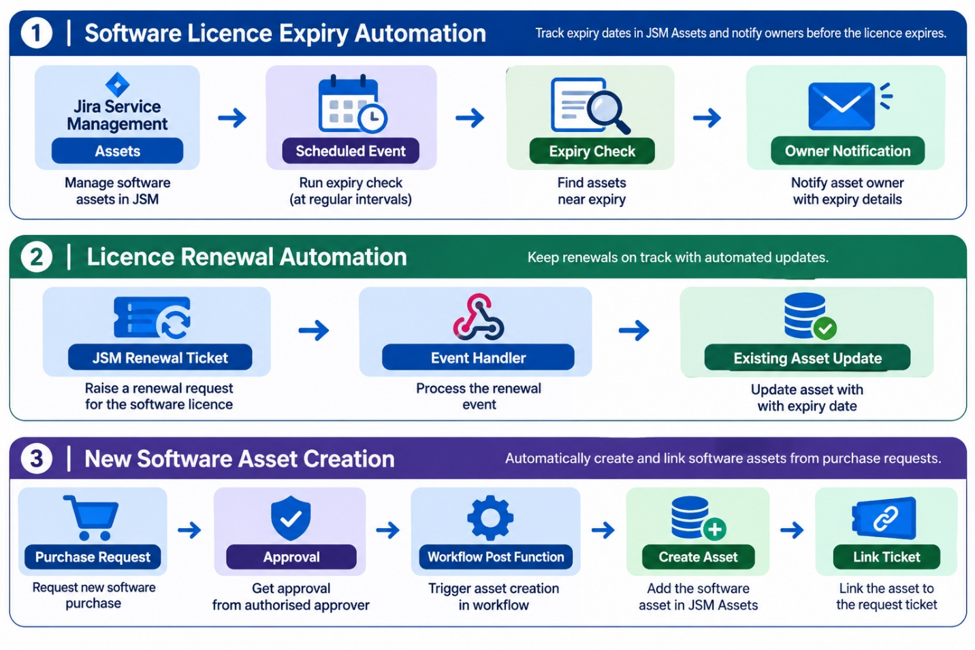
Use Case 1: Automatically Monitor Software License Expiry and Notify Owners
One of the most important aspects of software license management is ensuring that licenses are renewed before their expiry dates.
Organizations can use ScriptFabric’s Scheduled Events to periodically check software license records maintained in JSM Assets.
How Does It Work?
- Store software product and license information in JSM Assets, including:
- Product name
- License start date
- License expiry date
- License owner
- Manager responsible for the product
- Renewal information
- Configure a Scheduled Event in ScriptFabric to execute at a defined interval, such as daily or weekly.
- Use Canarys HAPI and the relevant Jira/Assets APIs to retrieve software license records and identify products approaching their expiry dates.
- Configure the script to identify licenses expiring within predefined notification windows:
- 90 days before expiry
- 60 days before expiry
- 30 days before expiry
- Automatically notify the respective license owner or responsible product manager.
Example Notification Workflow
| Expiry Timeline | Automated Action |
| 90 days | Notify the owner about the upcoming renewal |
| 60 days | Send a renewal reminder |
| 30 days | Send an urgent renewal notification |
The notification schedule can be customized based on organizational requirements.
For example, an organization can configure different reminder timelines for critical enterprise applications and standard software subscriptions.
Business Benefits
- Prevent unexpected software license expirations.
- Give procurement teams sufficient time to initiate renewals.
- Keep responsible stakeholders informed.
- Reduce manual monitoring and follow-ups.
- Improve software asset lifecycle visibility.
ScriptFabric features used: Scheduled Events and Canarys HAPI.
Use Case 2: Automatically Update Software License Renewal Details Through JSM Tickets
When an organization purchases or renews a software license, the corresponding asset information must be updated to reflect the latest renewal details.
Traditionally, an IT or asset management team member needs to locate the existing asset and manually update its renewal date and other relevant information.
ScriptFabric can automate this process using Event Handlers.
How Does It Work?
- A user raises a software purchase or license renewal request through a JSM ticket.
- The request contains the necessary information, such as:
- Software product name
- Existing asset reference
- Purchase date
- New licenses start date
- New renewal or expiry date
- License owner
- Purchase details
- Once the ticket is created or updated, ScriptFabric’s Event Handler can respond to the relevant Jira issue event.
- The script retrieves the required information from the ticket.
- It identifies the corresponding software asset in JSM Assets.
- The existing asset’s license information is automatically updated with the new renewal details.
Example Scenario
Consider an organization using a project management application with a license expiring on 31 December 2026.
The procurement team raises a license renewal request through JSM and provides the new license validity details.
Once the request reaches the configured processing stage, ScriptFabric can:
- Identify the existing software asset.
- Retrieve the new renewal date from the request.
- Update the corresponding asset record.
- Maintain the updated license information in JSM Assets.
This eliminates the need for an asset management team member to manually update the same information.
ScriptFabric features used: Event Handlers and Canarys HAPI, with the relevant Assets integration.
Use Case 3: Automatically Create New Software Assets After Purchase Approval
When an organization purchases a new software product, the product should be registered in its software asset inventory.
However, creating asset records manually after every approved purchase can introduce delays and inconsistencies.
ScriptFabric can automate new software asset creation as part of the JSM procurement workflow.
How Does It Work?
- A user raises a new software purchase request through JSM.
- The request includes product information such as:
- Software product name
- Vendor name
- License type
- Number of licenses
- Purchase date
- License validity
- Expiry date
- Responsible product owner
- The request follows the organization’s predefined approval workflow.
- Once the request is approved and reaches the configured completion or closure transition, a ScriptFabric Workflow Post Function executes.
- The script retrieves the approved purchase information from the JSM ticket.
- It automatically creates a new software product or license asset object in JSM Assets.
- The newly created asset is linked to the original JSM ticket for future reference.
Example Scenario
Suppose an organization purchases a new enterprise security software license.
The procurement team raises a purchase request in JSM, and the request goes through the necessary approval process.
After approval and completion, ScriptFabric automatically:
- Creates a new software asset record in JSM Assets.
- Populates the product name and vendor information.
- Updates the license start and expiry dates.
- Records the license owner and responsible team.
- Links the newly created asset to the original purchase request.
The purchase ticket becomes a reference point for the asset’s creation and procurement history.
Business Benefits
- Eliminate manual asset creation.
- Ensure newly purchased software is registered promptly.
- Maintain consistent asset information.
- Improve traceability between purchase requests and software assets.
- Reduce administrative overhead for IT asset management teams.
ScriptFabric features used: Workflow Rules (Post Functions), Canarys HAPI, and Jira/Assets integration.
How ScriptFabric Brings These Automations Together
The strength of ScriptFabric is that these different automation scenarios can be implemented within Jira Cloud using JavaScript-based scripting capabilities.
Each ScriptFabric feature plays a specific role in the software license management lifecycle.
| ScriptFabric Feature | Role in License Management |
| Scheduled Events | Periodically identify licenses approaching expiry |
| Event Handlers | Respond to relevant ticket events and automate asset updates |
| Workflow Post Functions | Execute asset creation after the configured purchase approval/completion transition |
| Canarys HAPI | Simplify Jira issue, user, and project operations |
| REST API Integration | Interact with JSM Assets to retrieve, create, update, and link asset records |
By combining these capabilities, organizations can build an end-to-end automated software license management process.
The Complete Automated Software License Lifecycle
With ScriptFabric, the process can be organized into three connected automation stages:
1. Monitor: Scheduled scripts periodically check software license expiry dates and notify responsible stakeholders.
2. Renew: Renewal requests raised through JSM trigger automated updates to existing software asset records.
3. Register: Approved new software purchases automatically create asset records and establish a reference link to the purchase ticket.
This creates a more structured and reliable approach to managing software licenses directly within the Jira ecosystem.
Why Choose ScriptFabric?
ScriptFabric is a Forge-native scripting and automation platform for Jira Cloud, designed to help administrators and developers extend Jira’s capabilities using JavaScript.
Instead of depending on multiple external automation solutions or maintaining separate infrastructure, organizations can use ScriptFabric’s capabilities within the Atlassian Forge environment.
Key capabilities include:
- Scheduled Events: Automate recurring license monitoring and expiry checks.
- Event Handlers: Execute custom logic in response to Jira events.
- Workflow Rules: Add custom logic to workflow conditions, validators, and post functions.
- Canarys HAPI: Simplify common Jira operations with a high-level JavaScript API.
- Execution Console: Test and execute scripts for operational tasks and bulk processing.
ScriptFabric provides the flexibility to implement automation scenarios that go beyond standard Jira workflow configurations.
Conclusion: Make Software License Management Smarter with ScriptFabric
Software license management doesn’t have to involve spreadsheets, manual reminders, repetitive asset updates, and disconnected procurement processes.
By leveraging ScriptFabric, organizations can automate license expiry monitoring, streamline renewal updates, and automatically create software asset records following successful purchase approvals.
The result is a more efficient, consistent, and traceable software license management process, all built around Jira Service Management and Assets.
Ready to automate your Jira processes?
Discover how ScriptFabric can help your organization unlock the full potential of Jira Cloud automation.
Explore ScriptFabric and start building smarter Jira workflows today.Learn more: ScriptFabric Documentation
About Canarys Automations
As an Atlassian Gold Partner, we help organizations maximize the value of Atlassian tools through expert implementation, customization, and reliable support across the entire Atlassian ecosystem. Partner with us to enhance collaboration, streamline workflows, and drive business success. Contact us at atlassiansupport@ecanarys.com to get started.