
The problem with unstructured business data
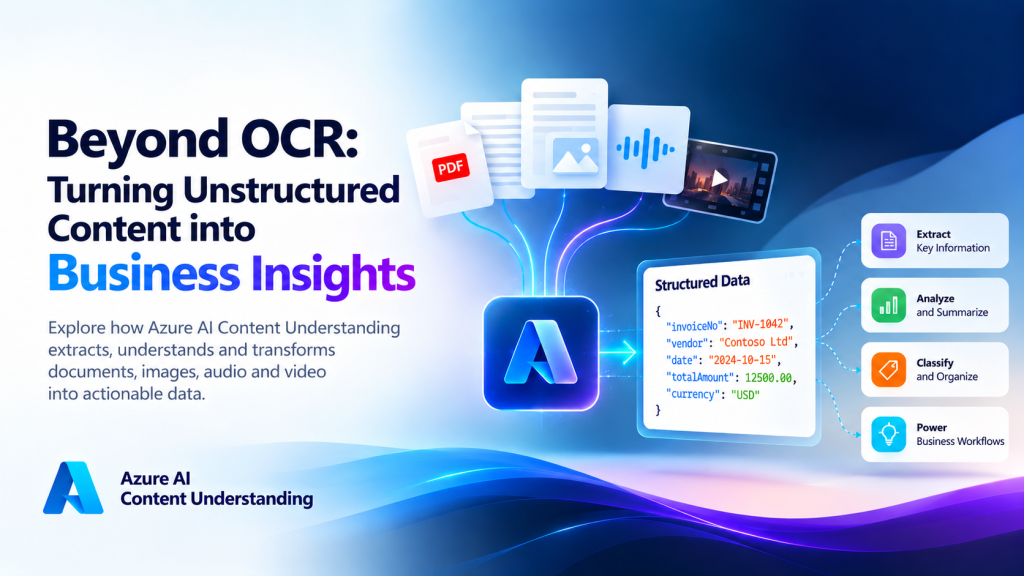
Most of the information a company runs on does not live in a database. It lives in invoices, contracts, scanned forms, email attachments, call recordings, meeting videos and product photos. Someone has to read, listen to or watch that content, decide what matters, and type it into a system.
That manual step is slow, expensive and error-prone. Traditional OCR helped by turning pixels into text, but text alone is not insight. An OCR engine can tell you that a page contains the characters. It cannot tell you that this is the invoice total, which purchase order it belongs to, or whether it matches what was ordered.
This is the gap that Azure AI Content Understanding is designed to close.
What is Azure AI Content Understanding?
Azure AI Content Understanding is a service that converts unstructured content into structured, application-ready data. It works across documents, images, audio and video in a single service, rather than requiring a different tool for each content type.
Three ideas define it:
- Multimodal input. One service handles PDFs, scans, images, recordings and video.
- Schema-driven extraction. You describe the fields you want and what each one means, and the service returns them as structured JSON.
- Trust built in. Results can include confidence scores and grounding, so you can see how reliable a value is and where in the source it came from.
The output is designed to feed downstream systems directly: workflows, dashboards, AI agents and search indexes for retrieval-augmented generation (RAG).
Understanding analyzers, prebuilt capabilities and custom schemas
The central concept is the analyzer. An analyzer is a configuration that tells the service how to process a type of content: what to extract, which fields to return, and which supported model deployments to use.
It is worth being precise here, because it is a common misunderstanding: an analyzer is not a single foundation model. It is a processing definition that can combine content extraction (such as OCR, layout and transcription) with generative AI to produce the fields you asked for.
You can work in two ways:
- Prebuilt analyzers cover common scenarios, so you can get useful results without defining anything. They are the fastest way to see what the service can do on your own files.
- Custom analyzers let you define a schema for your own business task. You list the fields, describe each in plain language, and the analyzer returns exactly that structure.
Fields can be filled in different ways, which is what makes the approach flexible:
| Approach | What it does | Example |
|---|---|---|
| Extract | Pulls a value that is explicitly in the content | Invoice number, due date |
| Classify | Chooses from categories you define | Document type: invoice, credit note, quote |
| Generate | Produces information based on the content | A two-line summary of a customer call |
Because the schema is described in language rather than trained from labeled samples, a new use case can often be prototyped in hours instead of weeks.
Exploring document, image, audio and video processing
The real strength of the service is that the same pattern, content in, schema-shaped JSON out, applies to every modality.
Documents. The service extracts text, paragraphs, tables and layout from PDFs and scans, then returns the fields you defined. Typical uses include invoices, contracts, claim forms and reports.
Images. Beyond reading text, an analyzer can describe what an image shows and pull out defined fields. Think of damage assessment photos, shelf images or product labels.
Audio. Recordings such as support calls can be transcribed and analyzed in one step. A schema might ask for customer name, issue category, resolution status and sentiment.
Video. Meetings, training sessions and media assets can be broken into segments and summarized, with structured fields for topics, decisions or action items.
For a business, this means one integration pattern instead of four separate projects.
Extracting information with structured JSON output
Structured output is what turns AI results into something an application can use. Instead of a paragraph of text to be parsed, you receive predictable fields.
Here is the kind of schema a team might define for supplier invoices (illustrative, not exact API syntax):
| Field | Type | Description |
|---|---|---|
| VendorName | String | Legal name of the supplier issuing the invoice |
| InvoiceNumber | String | Unique invoice identifier |
| PurchaseOrderNumber | String | PO referenced on the invoice, if any |
| InvoiceDate | Date | Date the invoice was issued |
| TotalAmount | Number | Final amount payable, including tax |
| LineItems | Array | Description, quantity, unit price and amount for each item |
The response returns these as JSON, so a workflow engine, a database or an AI agent can consume it without custom parsing code.
Using confidence scores and grounding for trustworthy results
Any honest conversation about AI in business has to address trust. Two features matter most.
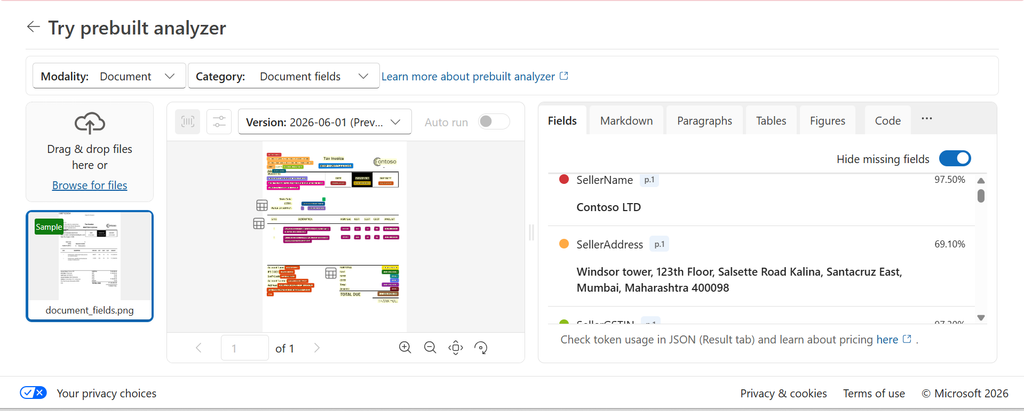
Confidence scores indicate how certain the service is about an extracted value. They let you design routing rules, for example: high-confidence fields continue automatically, and low-confidence fields go to a person for review.
Grounding links each extracted value back to its location in the source, such as the exact region on a page or the time range in a recording. A reviewer does not have to hunt through a 40-page contract. They can see the evidence immediately.
One important caution: a confidence score is an indicator, not a guarantee. A high score does not prove a value is correct, and a low score does not prove it is wrong. Treat these signals as inputs to a validation process, not as a replacement for one. Test on your own documents, including your worst scans, before setting thresholds.
Building an intelligent invoice-processing workflow
To see how these pieces fit together, consider an end-to-end scenario: matching supplier invoices against purchase orders.
Step 1: Input. An invoice PDF and its matching purchase order PDF arrive in a storage location or mailbox.
Step 2: Content Understanding. A custom analyzer extracts vendor, PO number, dates, totals and line items from both documents. Each value carries a confidence score and a link to its source location.
Step 3: Validation. Business rules compare the two sets of results: Does the vendor match? Do the PO numbers agree? Are quantities and unit prices consistent? Is the total within tolerance?
Step 4: Business outcome. Clean matches are approved automatically. Mismatches and low-confidence fields are flagged with their source evidence and sent for human review.
The result is not just extracted data. It is a decision-ready outcome: structured results, a discrepancy report, and people involved only where their judgment adds value.
Connecting extracted information to AI agents and RAG
Extraction is the foundation, but the larger value appears when the output is connected to other AI capabilities.
AI agents. In the invoice scenario, an agent can read the discrepancy list and write a plain-language review summary, such as “Line 3 shows 120 units invoiced against 100 ordered; unit price matches.” It can also route cases to the right approver. The agent adds reasoning and communication on top of reliable extracted fields.
Retrieval-augmented generation (RAG). Enterprise assistants are only as good as the knowledge behind them. Content Understanding produces structured output that preserves document structure, such as sections and tables, which makes content easier to chunk, index and retrieve. Combined with Azure AI Search, this helps an assistant answer questions grounded in your own contracts, manuals and recordings, and cite where the answer came from.
Security, validation, limitations and business considerations
Before taking this into production, plan for the following.
- Security and privacy. Use proper access control, review where your data is processed, and involve your security team for sensitive content. Confirm current data handling and compliance statements in Microsoft’s documentation.
- Human in the loop. Keep review steps for high-value or low-confidence cases, and feed corrections back into your process.
- Accuracy testing. Run a pilot on a representative sample of real files before committing to targets.
- Cost and scale. Pricing depends on content type and volume, and LLM-based processing can cost more than classic extraction at high volume. Use the Azure pricing calculator with your expected workload.
- Choosing the right tool. For standard, high-volume forms such as invoices and receipts, Azure AI Document Intelligence remains a strong, predictable choice. Content Understanding is the better fit for varied or unstructured content, multimodal inputs, and AI agent or RAG scenarios. The two can also be used together.
- Capability status. Features move between preview and general availability. Check the official documentation for the current status before designing around any specific capability, particularly newer agentic document features.
Conclusion: From content extraction to intelligent automation
OCR taught machines to read. Content Understanding goes further: it helps systems understand what documents, images, recordings and videos mean to the business, return that meaning as structured data, and show the evidence behind it.
The practical path forward is simple. Start with a prebuilt analyzer on your own files. Define a small custom schema for one real business problem. Add confidence-based review. Then connect the results to an agent or a search index.
The organizations that benefit most will not be the ones that extract the most data. They will be the ones that turn unstructured content into trusted decisions.
References
- Microsoft Learn, Azure AI Content Understanding overview.