
For this blog, we’ll enhance the advanced setup in our Instance-Security repo (a Java/Maven project) by creating a custom query pack to test CodeQL’s flexibility. If you haven’t explored our blog on Code Scanning with Advanced CodeQL Setup, we strongly recommend checking it out first, as it’s a prerequisite for following along with this blog. Click here to jump right in!
Running Additional Queries with CodeQL
When performing code scanning with CodeQL, the analysis engine creates a database from your codebase and executes a set of default queries. However, you can enhance your scans by adding extra queries to run alongside these defaults. This allows for more tailored and comprehensive analysis.
A query pack in CodeQL is a set of queries written in the CodeQL query language that search for specific patterns in your code. While default packs like security-and-quality cover common issues, custom packs let you define rules tailored to your project, such as spotting hard-coded credentials or unsafe logging practices.
Here, we’ll build a custom query pack called Unsafe Logging Detection to catch potentially risky logging (e.g., logging sensitive data like passwords) in Instance-Security Repo.
Note: This blog is the 3rd part of our series on Code Scanning in GitHub using CodeQL. To navigate directly to a specific section, please refer to the links below:
- 1. Secure Your Code with GitHub Code Scanning and CodeQL
- 2. Enhance Code Security with GitHub Code Scanning and Advanced CodeQL Setup
- 3. Boost Code Security with GitHub Code Scanning Using Third-Party Actions
Steps to Create the Custom Query Pack
Step 1: Set Up the Directory Structure
CodeQL query packs need a specific layout with a qlpack.yml file to define them.
👉🏻 Create a Queries Directory: In your repo in this case in Instance-Security, add a folder: .github/queries

Add a Subdirectory for the Pack: Inside .github/queries, create: .github/queries/unsafe-logging
Step 2: Create the Unsafe Logging Query
This pack will detect unsafe logging practices, like logging sensitive data without sanitization.
👉🏻 Create the Query File: In .github/queries/unsafe-logging, add a file named unsafe-logging.ql
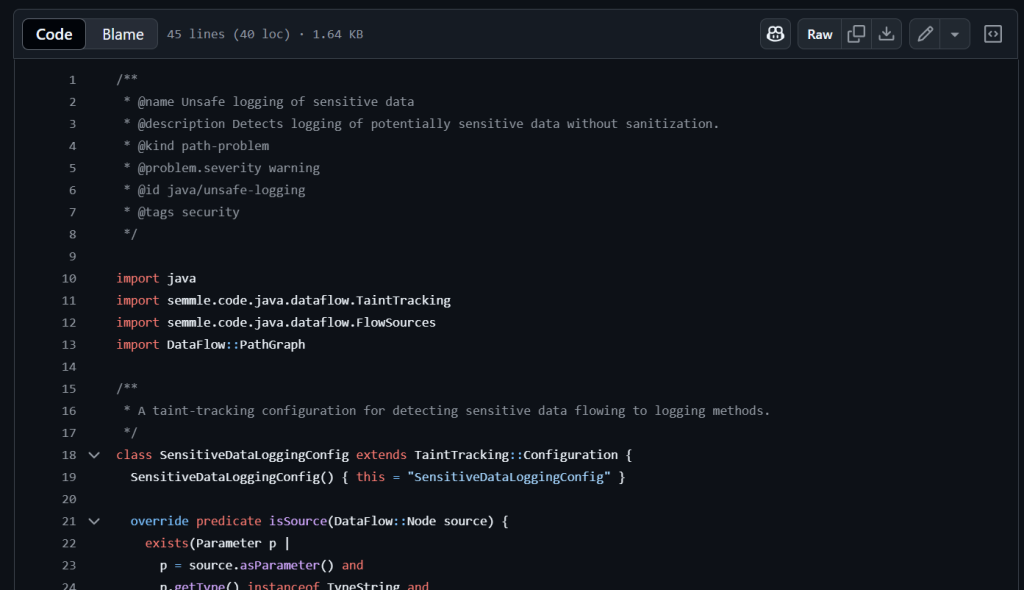
/**
 * @name Unsafe logging of sensitive data
 * @description Detects logging of potentially sensitive data without sanitization.
 * @kind path-problem
 * @problem.severity warning
 * @id java/unsafe-logging
 * @tags security
 */

import java
import semmle.code.java.dataflow.TaintTracking
import semmle.code.java.dataflow.FlowSources
import DataFlow::PathGraph

/**
 * A taint-tracking configuration for detecting sensitive data flowing to logging methods.
 */
class SensitiveDataLoggingConfig extends TaintTracking::Configuration {
  SensitiveDataLoggingConfig() { this = "SensitiveDataLoggingConfig" }

  override predicate isSource(DataFlow::Node source) {
    exists(Parameter p |
      p = source.asParameter() and
      p.getType() instanceof TypeString and
      p.getName().toLowerCase().matches("%password%")
    )
  }

  override predicate isSink(DataFlow::Node sink) {
    exists(MethodAccess ma |
      ma.getMethod().hasName(["info", "debug", "warn", "error", "trace", "log"]) and
      (
        ma.getMethod().getDeclaringType().getASourceSupertype*().hasQualifiedName("org.slf4j", "Logger") or
        ma.getMethod().getDeclaringType().getASourceSupertype*().hasQualifiedName("org.apache.logging.log4j", "Logger") or
        ma.getMethod().getDeclaringType().getASourceSupertype*().hasQualifiedName("java.util.logging", "Logger")
      ) and
      sink.asExpr() = ma.getArgument(0)
    )
  }
}

from DataFlow::PathNode source, DataFlow::PathNode sink, SensitiveDataLoggingConfig config
where config.hasFlowPath(source, sink)
select sink.getNode(), source, sink, "Potentially unsafe logging of sensitive data from $@.",
source.getNode(), "sensitive parameter"Explanation:
- a. SensitiveDataLoggingConfig: Sets up taint tracking to monitor sensitive data flow to logging methods.
b. SensitiveSource: Identifies String parameters named password (or similar) as potential sensitive data sources.
c. LoggingSink: Targets logging methods (info, debug, etc.) in SLF4J, Log4j, or Java Util Logging, marking the logged argument as the sink.
d. TaintTracking::hasFlowPath: Tracks if sensitive data flows from the source to the logging sink.
e. select: Flags unsafe logging with the data flow path from the sensitive parameter to the logging call.
Step 3: Define the Query Pack
👉🏻 Create the qlpack.yml File: In .github/queries/unsafe-logging, add qlpack.yml:
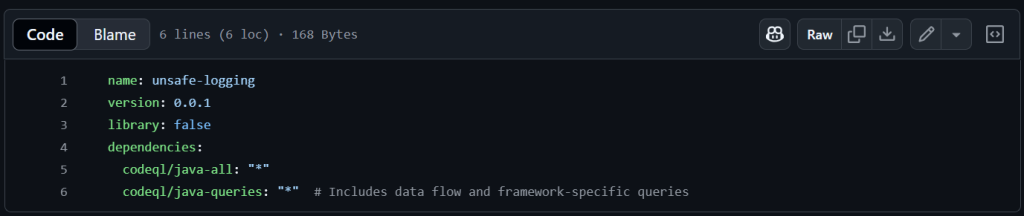
Explanation:
- a. name: Names the pack.
b. version: Tracks updates (start at 0.0.1)
c. library:false: Marks it as a query pack, not a library.
d. dependencies: Pulls in codeql/java-all for Java basics and codeql/java-queries for data flow and SLF4J support.
Step 4: Update the CodeQL Workflow
Modify the existing codeql.yml in .github/workflows to include the custom pack:
👉🏻 Find the queries section and add:
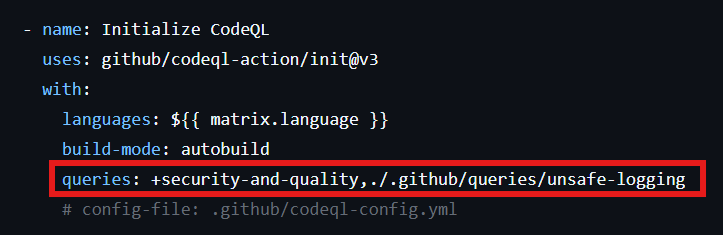
This runs both the default pack and our custom unsafe-logging pack.
Step 5: Test the Custom Query Pack
To see it in action, let’s add some risky code to Instance-security Repo.
👉🏻 Create a Test File: In src/main/java/, add LoggerExample.java:
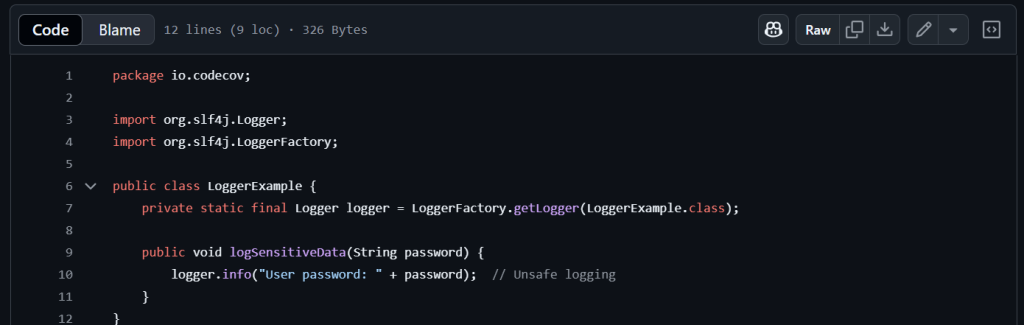
Add SLF4J Dependency: Let’s update the pom.xml to include SLF4J:
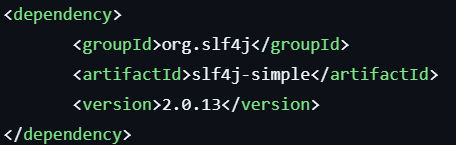
Commit and push this code. The next scan will trigger the unsafe-logging query and flag the issue.
Expected Results
Unsafe Logging:
The unsafe-logging query should flag the logger.info(“User password: ” + password) line in LoggerExample.java.
Checking Your Code Scanning Results
After setting up code scanning in your GitHub repository, like our Instance-Security example, you’ll want to dive into the results to spot any vulnerabilities or issues. Here’s a quick and clear guide to view them:
1. Open Your Repository: Head to your GitHub repo in a browser. For this guide, we’re using Instance-Security.
2. Go to the Security Tab: Click the Security tab at the top. Can’t see it? Check the dropdown menu.

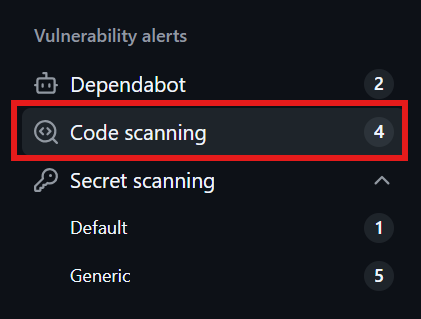
3. Locate Code Scanning Alerts: In the left sidebar, under “Vulnerability alerts,” select Code scanning to view all scan results.
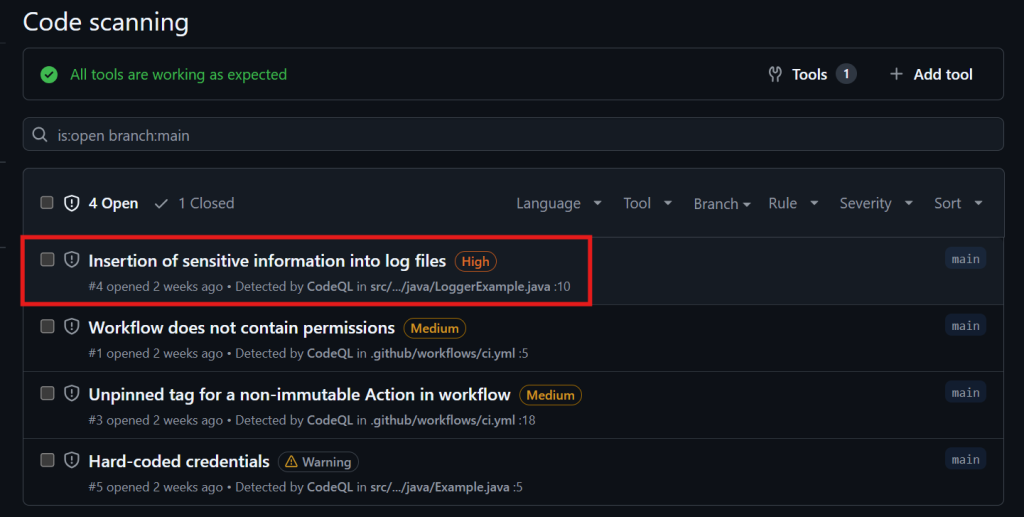
4. Explore the Alerts: You’ll get a list of alerts, each showing the issue type (e.g., “SQL Injection”), severity (low, medium, high), and more. For example, our setup flagged “Insertion of sensitive information into log files” as high severity.
5. Dig Deeper: Click an alert for a detailed breakdown, including the affected code and suggested fixes (if provided).
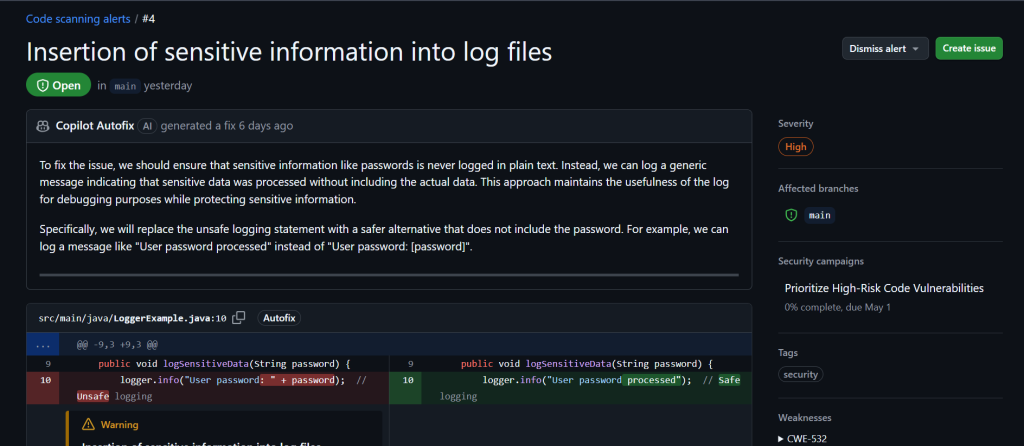
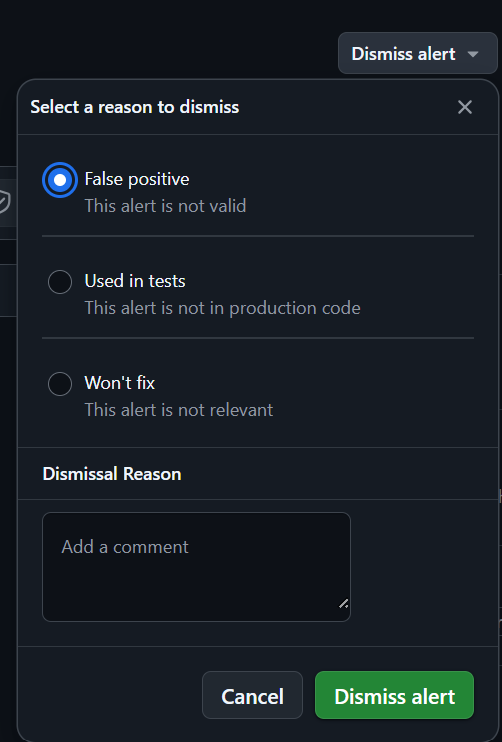
6. Act on It: Fix the issue right from the alert or dismiss it with a reason like False Positive (not valid), Used in Tests (not in production), or Won’t Fix (not applicable).
Summing Up GitHub Code Scanning with Tailored Query Packs
In this blog, we’ve delved into Code Scanning with an Advanced CodeQL setup, spotlighting the power of Custom Query packs. Not keen on CodeQL? No problem! You can leverage third-party tools like SonarQube or Checkmarx through GitHub Actions for seamless scanning. Curious? Explore our blog on Configuring Code Scanning with Third-Party Actions for more details.
Canarys Automations, proudly recognized as GitHub’s Channel Platform Partner of the Year 2024, is ready to elevate your GitHub expertise. To learn more or receive personalized guidance, get in touch with us.