
In Jira Service Management (JSM), different request types follow different processes. Some requests need approval, and some do not.
Instead of creating many workflows, JSM allows admins to use one workflow and control which steps are visible based on the request type.
Why This Is Useful
For example:
- Request New Hardware → Needs approval
- Password Reset → No approval needed
If approval steps appear for all requests, it can confuse agents. By restricting workflow transitions, only the required steps are shown.
How It Works
JSM lets admins hide or show workflow transitions using conditions.
Simple steps:
- Go to Project Settings
- Open Workflows
- Edit the workflow
- Select a transition (for example: Waiting for Approval)
- Add a condition based on Request Type
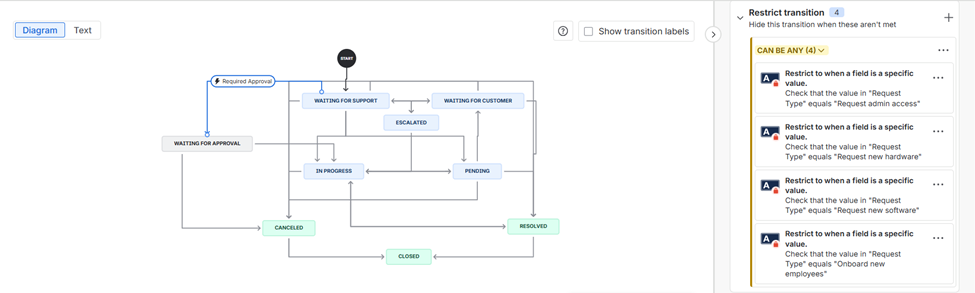
Now:
- Approval steps appear only for request types that need approval
- Other request types will not see those steps
Conclusion
Using request-type-based workflow restrictions in JSM helps admins keep things simple. You can manage different request types with one workflow while showing only the steps that are needed.
To know more about Jira software maintenance or administrating contact us. If you need assistance on Jira implementation or any guidance on Atlassian product suite, contact us at devopstools@ecanarys.com
As an Atlassian Gold Partner, we help organizations maximize the value of Atlassian tools through expert implementation, customization, and reliable support across the entire Atlassian ecosystem. Partner with us to enhance collaboration, streamline workflows, and drive business success. Contact us at atlassiansupport@ecanarys.com to get started.