
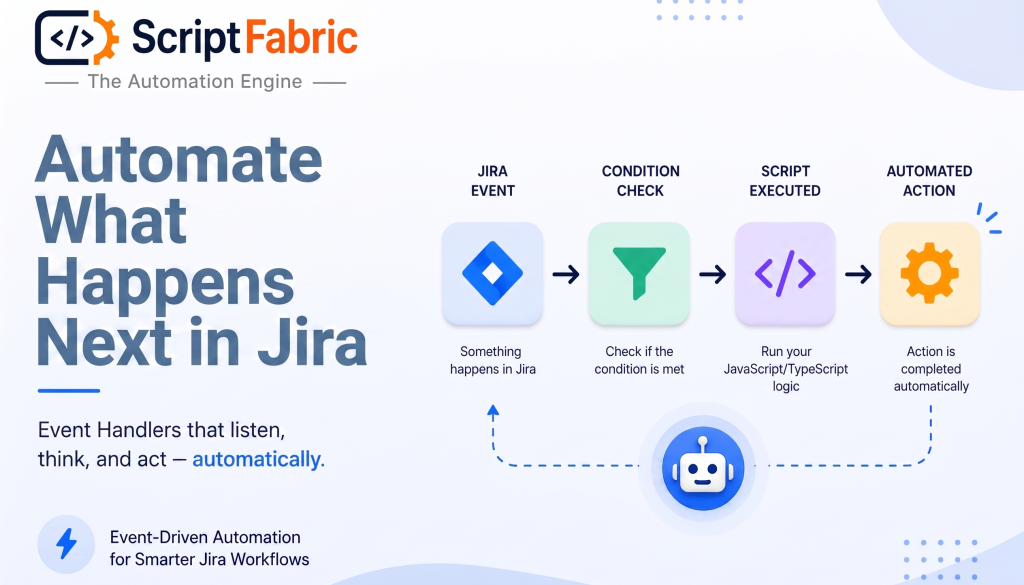
We’ve all experienced this while managing Jira.
An issue is created, a Critical bug needs attention, a Story needs its standard subtasks, or an issue moves to a new status-and someone still needs to take the next action.
These small manual steps may seem routine, but as Jira usage grows, they quickly add up. Teams spend time repeating tasks, important follow-ups can be missed, and workflows become dependent on people remembering what to do next.
This is where ScriptFabric “Event Handlers” come in.
Meet Event Handlers
Event Handlers allow you to automate Jira actions by running your scripts automatically when specific events occur.
Instead of manually responding whenever something happens in Jira, you can configure an Event Handler to listen for an event, evaluate your conditions, and execute your custom JavaScript logic.
The basic idea is simple:
Jira Event → Condition → JavaScript/TypeScript Logic → Automated Action
Why Event-Driven Automation Matters
Jira workflows often involve more than simply moving an issue from one status to another.
A single Jira event can trigger several follow-up actions.
For example, when a new Story is created, your team might need to:
- Create standard subtasks
- Set specific fields
- Apply project-specific rules
- Perform additional actions
- Trigger custom business logic
Without automation, these steps depend on someone noticing the event and taking the required action.
That creates two common problems: repetitive work and missed actions.
Event-driven automation changes this approach. Instead of relying on someone to remember what needs to happen after an event, you define the behavior once and let ScriptFabric execute it automatically whenever the relevant event occurs.
Before vs. After Event Handlers
The difference becomes clear when you look at what happens after a Jira event occurs.
Before ScriptFabric Event Handlers
An issue is created, and someone needs to notice it, remember what needs to happen next, and perform the required actions.
Issue Created → Someone Notices → Remembers → Performs Action
For example, when a Story is created, someone may need to notice it, create the required subtasks, update fields, and perform any additional setup.
As the number of issues grows, repeating these steps manually takes time and creates more opportunities for something to be missed.
With ScriptFabric Event Handlers
With ScriptFabric, you define the behavior once. When the configured event occurs, ScriptFabric checks the condition and executes your script automatically.
Issue Created → Event Detected → Condition Checked → Script Executed → Action Completed
How Event Handlers Work
Setting up an Event Handler comes down to three key parts: choosing the event, defining the condition, and writing the script.
1. The Event: This is the trigger – the thing that happens in Jira that ScriptFabric is listening for. Common events include:
- Issue created
- Issue updated
- Issue transitioned (status change)
- Comment added
- Issue deleted
- Worklog logged
2. The Condition: Not every event should trigger your script. The condition is a filter that decides whether the handler should run. This could be as simple as checking the issue type, or as specific as checking a custom field value, project key, or priority level. Only when the condition evaluates to true does ScriptFabric move on to executing your logic.
3. The Script: This is where your custom JavaScript or TypeScript logic lives. You get access to the triggering issue’s data and Jira’s APIs, so you can create subtasks, update fields, add comments, send notifications, or call external services – whatever the workflow requires.
Conclusion
The goal isn’t to automate everything-it’s to automate the right things.
Whether you’re automating issue setup, enforcing project rules, or responding to changes, Event Handlers give you a flexible way to build automation around the way your team works.
Want to learn more about ScriptFabric? Explore the ScriptFabric documentation to discover all its features and capabilities.
About Canarys Automations
As an Atlassian Gold Partner, we help organizations maximize the value of Atlassian tools through expert implementation, customization, and reliable support across the entire Atlassian ecosystem. Partner with us to enhance collaboration, streamline workflows, and drive business success. Contact us at atlassiansupport@ecanarys.com to get started.