
Imagine working on a project where multiple tasks are assigned to different team members. Some tasks are completed, others are still in progress, and a few are waiting to be started. Without a clear way to track everything, managing the workflow can quickly become confusing. This is where Jira Boards help teams bring structure, visibility, and organization to their daily work
What Are Jira Boards?
A Jira Board is a visual tool that helps teams organize and track their work. It displays work items in different columns based on their current status, such as To Do, In Progress, and Done.
Instead of checking individual tasks one by one, team members can use a board to get a quick overview of the entire workflow. They can easily identify which tasks are pending, which are being worked on, and which have been completed.
Jira provides two popular board types based on Agile methodologies: Scrum and Kanban.
Understanding Jira Scrum Boards
A Scrum Board is designed for teams that work in fixed time periods called Sprints. A sprint is a specific period, usually one to four weeks, during which the team plans and completes a selected set of work items.
Scrum boards help teams plan their work, track sprint progress, and review completed tasks.
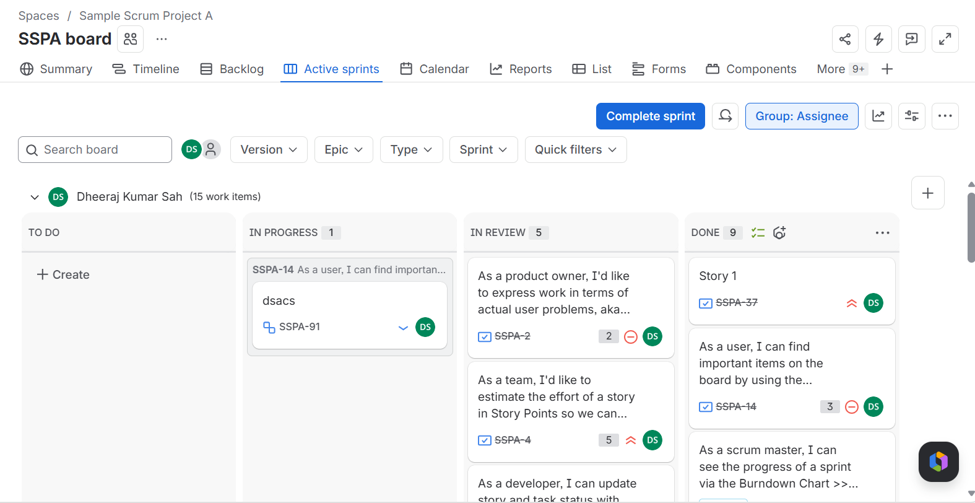
Let’s understand some important elements of a Scrum Board.
1. Backlog
The Backlog is where teams maintain and prioritize work items that need to be completed. Before starting a sprint, team members select the required tasks from the backlog and add them to the sprint.
2. Sprint Planning
Sprint Planning is where the team decides which tasks will be completed during the upcoming sprint. The team discusses priorities, estimates the effort, and sets a sprint goal.
3. Active Sprint
Once a sprint starts, the selected work items appear on the active Scrum Board. Team members move these items across different columns as work progresses.
Understanding Jira Kanban Boards
Unlike Scrum, which works with fixed-length sprints, a Kanban Board focuses on continuous workflow. It allows teams to manage work as an ongoing process without dividing it into predefined sprints.
Tasks are added to the board and move through different stages as team members complete them. This makes Kanban useful for teams that handle incoming requests, ongoing support activities, or regular bug fixes.
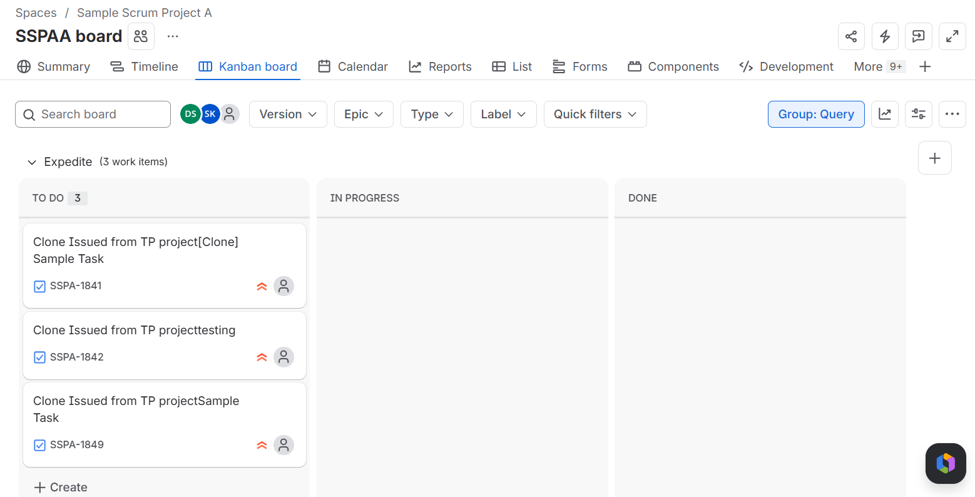
Let’s look at some important elements of a Kanban Board.
1. Continuous Workflow
Work items move continuously through different stages, such as To Do, In Progress, and Done. Team members pick up new tasks as they become available.
2. Work in Progress (WIP) Limits
WIP limits control how many tasks can be in progress within a particular column at a time. They help teams avoid taking on too much work simultaneously and encourage completing existing tasks before starting new ones.
Scrum vs. Kanban Boards: What’s the Difference?
Both Scrum and Kanban boards help teams visualize and manage their work. However, they differ in how tasks are planned, organized, and completed.
Here is a quick comparison:
| Feature | Scrum Board | Kanban Board |
| Work Approach | Sprint-based | Continuous workflow |
| Planning | Work is planned before each sprint | Work is picked up continuously |
| Backlog | Used for managing and prioritizing tasks | Optional |
| Sprint | Uses fixed-length sprints | Does not require sprints |
| Work Management | Tasks are selected for each sprint | Tasks move continuously |
| WIP Limits | Sprint scope helps manage workload | Explicit limits can be configured |
| Reporting | Burndown, Velocity, Sprint Reports | Cumulative Flow Diagram, Control Chart |
| Best Suited For | Product development and feature delivery | Support, maintenance, and ongoing operations |
Which Jira Board Should You Choose?
Choosing between Scrum and Kanban depends on how your team manages its work.
Choose Scrum if:
- Your team works with fixed deadlines and sprint goals.
- You need regular sprint planning and reviews.
- Your project involves developing features in planned iterations.
- You want to track sprint progress using reports.
Choose Kanban if:
- Your team handles continuous incoming work.
- Tasks need to be completed based on priority.
- You want flexibility in managing daily activities.
- Your team focuses on maintaining a continuous workflow.
About Canarys Automations
As an Atlassian Gold Partner, we help organizations maximize the value of Atlassian tools through expert implementation, customization, and reliable support across the entire Atlassian ecosystem. Partner with us to enhance collaboration, streamline workflows, and drive business success. Contact us at atlassiansupport@ecanarys.com to get started.